Calendar
All your money events in one place: bills, card statements, income, and recurring charges. (Plus+)
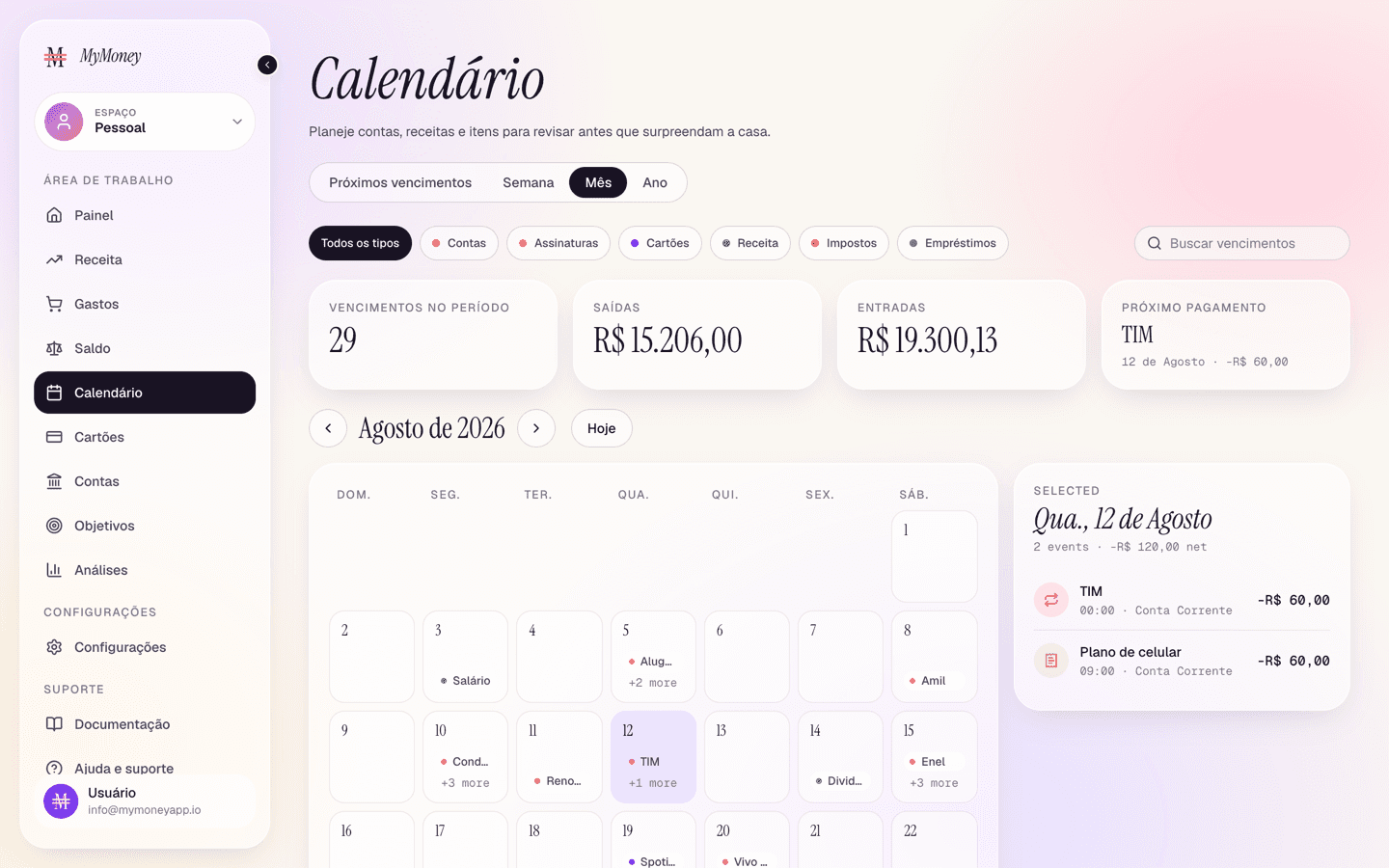
The Calendar (Plus and above) lays out everything with a date — so nothing surprises you.
What appears on it
Four sources are merged automatically:
- transactions with dates or due dates;
- recurring series projected into the future (including custom "every N days" schedules);
- scheduled items like bills and taxes;
- credit card bills, dated on each card's due day, with live amounts (see Credit card statements and bills).
Views and filters
- Views: Year (overview, click a month to open it), Month (the main grid), Week, and Due list — a simple list of everything due in the next ~45 days.
- Type filters: All, Bills, Cards, Income, Loans, Subscriptions, Tax.
- Search box for finding an item by title, account, or note.
- Summary cards above the grid: items in view, outgoing, incoming, and the next due date.
- Navigate with previous / next / Today.
Working with a day
Click any day in the Month view to open the day detail panel: each item with its amount, account, type, and a status badge — Scheduled, Auto-pay, Review, Paid, or the red Payment due for an overdue card bill.
Card bills are actionable: click one (in the day detail or the due list) to open the pay-bill modal and mark it paid on the spot.