Dashboard
Your home page: total balance, goals, upcoming bills, and recent activity at a glance.
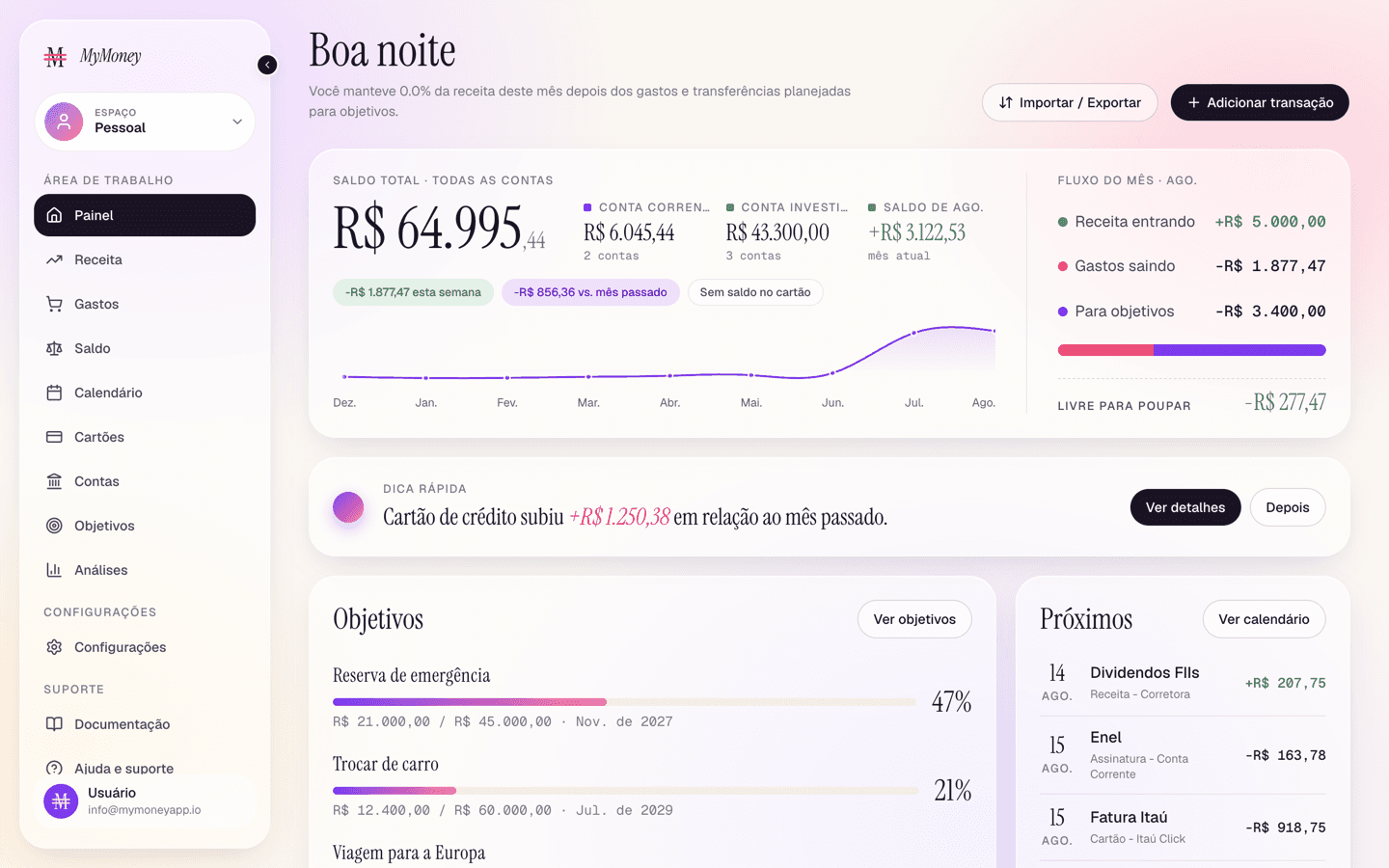
The Dashboard is the first page after signing in. It answers "how am I doing right now?" in one screen.
What's on it
-
Greeting header — a personalized summary line, plus the Add transaction and Import/Export buttons.
-
Balance overview — your total balance across bank accounts, a trend sparkline, and this month's cash flow. Click through to the Accounts page for detail.
Credit card spending never lowers this number — cards are settled later by their statement bill. See Credit card statements and bills.
-
Quick tip (Plus+) — a contextual suggestion based on your data, with a one-click action.
-
Goals — progress bars for your top goals, linking to the Goals page.
-
Upcoming — your next scheduled money events: bills, subscriptions, expected income, and credit card bills with their live amounts. An unpaid card bill shows a red "Payment due" badge from its due day onward — click it to pay (see the bill modal).
-
Recent transactions — your latest activity in a table you can search, filter (All / Income / Expenses), sort, and page through. Click any row to edit that transaction.
Common tasks from here
- Add an expense or income — click Add transaction (top right).
- Pay a card bill — click the bill row in Upcoming.
- Import your history — click Import/Export (see Import and export).